
Cariigo
SZHAIYIJIN SD Card Reader for iPhone, Memory Card Reader with USB Camera Adapter Plug and Play Trail Game Camera Viewer Supports SD and TF Card MicroSD Card Adapter for iPad No App Required
SZHAIYIJIN

SZHAIYIJIN SD Card Reader for iPhone, Memory Card Reader with USB Camera Adapter Plug and Play Trail Game Camera Viewer Supports SD and TF Card MicroSD Card Adapter for iPad No App Required

$8.07

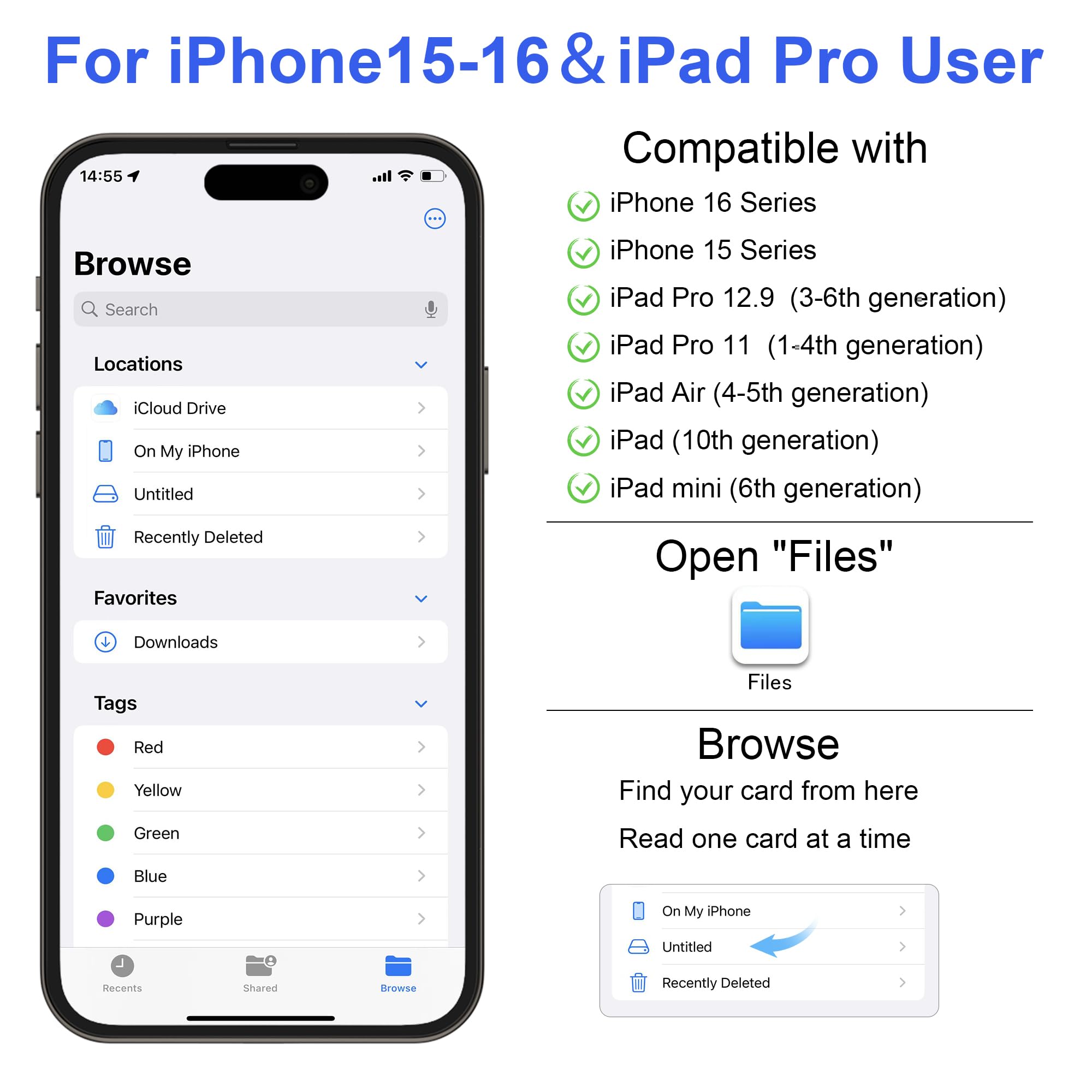
Product Overview: Import photos and videos from your camera to your iPhone anytime. This card reader can read files captured by digital cameras, dash cams, or trail cameras, allowing you to quickly view and share photos or videos. With the USB adapter, you can also connect your iPhone to devices such as USB flash drives, keyboards, camera data cables, and more. Main Functions and How to Use: Read USB Flash Drives: Connect a USB flash drive to your iPhone through the adapter and directly view and manage files in the “Files” app without using a computer. Connect a Keyboard/Mouse: Connect a keyboard or mouse for easier typing and operation. Connect to Another iPhone/iPad: Use a data cable and adapter to share photos between devices. Connect a Digital Camera: Use the data cable included with your camera to directly read photos from the camera. Compatibility: Lightning Port (iPhone): iPhone 5 to iPhone 14 series Lightning Port (iPad): iPad 5th/6th/7th/8th/9th generation, iPad Mini 1/2/3/4, iPad Air 1/2, iPad Pro 12.9"/9.7"/10.5" USB-C Port (iPhone): iPhone 15 / 15 Plus / 15 Pro / 15 Pro Max, iPhone 16 / 16 Plus / 16 Pro / 16 Pro Max, iPhone 17 / 17 Pro / 17 Pro Max / 17 Air / 17e USB-C Port (iPad): iPad 10.9-inch 10th generation, iPad Pro 12.9" 3rd–6th generation, iPad Pro 11" M4/M5, iPad Air M2/M3/M4 Mac: Compatible with 2016–2026 MacBook, MacBook Air, MacBook Pro, iMac including 2017–2024 models, Mac Pro, Mac Mini, Mac Studio, and more Android (USB-C): Samsung Galaxy, Google Pixel, and other Android phones that support USB-C and have OTG enabled iOS 9.2 to iOS 12.5.7 One-Way Transfer Instructions: Import Using the “Photos” App: Only supports importing photos/videos taken by a camera from the card to the device one way. Other file types cannot be managed. Steps: Insert the memory card containing photos/videos into the card reader and connect it to the device. Open the “Photos” app, select “Import,” and choose the content you want to import. Note: If the files on the card were not captured by a digital camera, the Photos app may not recognize them. Please upgrade to iOS 13 or later to support more file types. iOS 13 and Later Two-Way Transfer Instructions: Use the “Files” App: Browse and transfer files between “On My iPhone” iPhone data and “Untitled” or “NONAME,” meaning the memory card. Supports multiple formats such as JPG, MP3, Word, Excel, PDF, and more, enabling two-way transfer between the card and the device. Steps: Insert the memory card into the card reader and connect it to the device. Open the “Files” app to view and transfer files. Product Highlights: Photography Accessory: Suitable for Canon, Nikon, and other DSLR cameras. No app download required. Insert the memory card and connect the device, then open the “Photos” app after 5 seconds and find “Import” to import photos and videos. Dual Card Slot Support: Supports standard SD/SDHC and Micro SD/TF cards. Does not support Wi-Fi SD cards. Female USB Port: The Lightning to USB adapter features a female USB port and supports connection to digital cameras, USB flash drives, card readers, USB headphones, electric guitars, MIDI keyboards, and more. The maximum current of external devices must not exceed 500 mA. Printers and mechanical hard drives are not supported. Dual-Connector Design: The SD card reader offers dual compatibility with USB-C and Lightning, including a detachable USB-C to Lightning adapter. It works with modern USB-C devices and older Apple devices, making it easy to transfer photos, videos, and files across platforms. Supports OTG functions for iOS, Android, Windows, and macOS. Two-Way Transfer: Supports two-way transfer on iOS 13–18. You can import from the card or export files from an iPhone/iPad to an SD/TF card. Supports file types such as movies, music, Word, PPT, Excel, PDF, and more. Technical Specifications: Supported Media Types: SD card, USB 3.0, microSD Connectivity Technology: Lightning, USB Type-C Additional Features: Compact size, easy installation, plug and play Compatible Devices: Laptop, smartphone, tablet, iPhone Data Transfer Rate: 25 MB/s Hardware Interface: Lightning Number of Slots: 3 Color: White Dimensions (L × W × H): 5.98" × 2.36" × 0.54" Brand: SZHAIYIJIN Model: Lightning to SD Card Reader with USB Adapter Manufacturer: SZHAIYIJIN

Color
QTY
1
Only 2 left
Free shipping
Expected to deliver by Oct 5 · FREE delivery on eligible orders $33+
Return policy
30-Day Refund
Member rewards
1% Cash Back

Product Overview: Import photos and videos from your camera to your iPhone anytime. This card reader can read files captured by digital cameras, dash cams, or trail cameras, allowing you to quickly view and share photos or videos. With the USB adapter, you can also connect your iPhone to devices such as USB flash drives, keyboards, camera data cables, and more. Main Functions and How to Use: Read USB Flash Drives: Connect a USB flash drive to your iPhone through the adapter and directly view and manage files in the “Files” app without using a computer. Connect a Keyboard/Mouse: Connect a keyboard or mouse for easier typing and operation. Connect to Another iPhone/iPad: Use a data cable and adapter to share photos between devices. Connect a Digital Camera: Use the data cable included with your camera to directly read photos from the camera. Compatibility: Lightning Port (iPhone): iPhone 5 to iPhone 14 series Lightning Port (iPad): iPad 5th/6th/7th/8th/9th generation, iPad Mini 1/2/3/4, iPad Air 1/2, iPad Pro 12.9"/9.7"/10.5" USB-C Port (iPhone): iPhone 15 / 15 Plus / 15 Pro / 15 Pro Max, iPhone 16 / 16 Plus / 16 Pro / 16 Pro Max, iPhone 17 / 17 Pro / 17 Pro Max / 17 Air / 17e USB-C Port (iPad): iPad 10.9-inch 10th generation, iPad Pro 12.9" 3rd–6th generation, iPad Pro 11" M4/M5, iPad Air M2/M3/M4 Mac: Compatible with 2016–2026 MacBook, MacBook Air, MacBook Pro, iMac including 2017–2024 models, Mac Pro, Mac Mini, Mac Studio, and more Android (USB-C): Samsung Galaxy, Google Pixel, and other Android phones that support USB-C and have OTG enabled iOS 9.2 to iOS 12.5.7 One-Way Transfer Instructions: Import Using the “Photos” App: Only supports importing photos/videos taken by a camera from the card to the device one way. Other file types cannot be managed. Steps: Insert the memory card containing photos/videos into the card reader and connect it to the device. Open the “Photos” app, select “Import,” and choose the content you want to import. Note: If the files on the card were not captured by a digital camera, the Photos app may not recognize them. Please upgrade to iOS 13 or later to support more file types. iOS 13 and Later Two-Way Transfer Instructions: Use the “Files” App: Browse and transfer files between “On My iPhone” iPhone data and “Untitled” or “NONAME,” meaning the memory card. Supports multiple formats such as JPG, MP3, Word, Excel, PDF, and more, enabling two-way transfer between the card and the device. Steps: Insert the memory card into the card reader and connect it to the device. Open the “Files” app to view and transfer files. Product Highlights: Photography Accessory: Suitable for Canon, Nikon, and other DSLR cameras. No app download required. Insert the memory card and connect the device, then open the “Photos” app after 5 seconds and find “Import” to import photos and videos. Dual Card Slot Support: Supports standard SD/SDHC and Micro SD/TF cards. Does not support Wi-Fi SD cards. Female USB Port: The Lightning to USB adapter features a female USB port and supports connection to digital cameras, USB flash drives, card readers, USB headphones, electric guitars, MIDI keyboards, and more. The maximum current of external devices must not exceed 500 mA. Printers and mechanical hard drives are not supported. Dual-Connector Design: The SD card reader offers dual compatibility with USB-C and Lightning, including a detachable USB-C to Lightning adapter. It works with modern USB-C devices and older Apple devices, making it easy to transfer photos, videos, and files across platforms. Supports OTG functions for iOS, Android, Windows, and macOS. Two-Way Transfer: Supports two-way transfer on iOS 13–18. You can import from the card or export files from an iPhone/iPad to an SD/TF card. Supports file types such as movies, music, Word, PPT, Excel, PDF, and more. Technical Specifications: Supported Media Types: SD card, USB 3.0, microSD Connectivity Technology: Lightning, USB Type-C Additional Features: Compact size, easy installation, plug and play Compatible Devices: Laptop, smartphone, tablet, iPhone Data Transfer Rate: 25 MB/s Hardware Interface: Lightning Number of Slots: 3 Color: White Dimensions (L × W × H): 5.98" × 2.36" × 0.54" Brand: SZHAIYIJIN Model: Lightning to SD Card Reader with USB Adapter Manufacturer: SZHAIYIJIN

SZHAIYIJIN SD Card Reader for iPhone, Memory Card Reader with USB Camera Adapter Plug and Play Trail Game Camera Viewer Supports SD and TF Card MicroSD Card Adapter for iPad No App Required detail image 1SZHAIYIJIN SD Card Reader for iPhone, Memory Card Reader with USB Camera Adapter Plug and Play Trail Game Camera Viewer Supports SD and TF Card MicroSD Card Adapter for iPad No App Required detail image 2SZHAIYIJIN SD Card Reader for iPhone, Memory Card Reader with USB Camera Adapter Plug and Play Trail Game Camera Viewer Supports SD and TF Card MicroSD Card Adapter for iPad No App Required detail image 3SZHAIYIJIN SD Card Reader for iPhone, Memory Card Reader with USB Camera Adapter Plug and Play Trail Game Camera Viewer Supports SD and TF Card MicroSD Card Adapter for iPad No App Required detail image 4SZHAIYIJIN SD Card Reader for iPhone, Memory Card Reader with USB Camera Adapter Plug and Play Trail Game Camera Viewer Supports SD and TF Card MicroSD Card Adapter for iPad No App Required detail image 5SZHAIYIJIN SD Card Reader for iPhone, Memory Card Reader with USB Camera Adapter Plug and Play Trail Game Camera Viewer Supports SD and TF Card MicroSD Card Adapter for iPad No App Required detail image 6SZHAIYIJIN SD Card Reader for iPhone, Memory Card Reader with USB Camera Adapter Plug and Play Trail Game Camera Viewer Supports SD and TF Card MicroSD Card Adapter for iPad No App Required detail image 7SZHAIYIJIN SD Card Reader for iPhone, Memory Card Reader with USB Camera Adapter Plug and Play Trail Game Camera Viewer Supports SD and TF Card MicroSD Card Adapter for iPad No App Required detail image 8SZHAIYIJIN SD Card Reader for iPhone, Memory Card Reader with USB Camera Adapter Plug and Play Trail Game Camera Viewer Supports SD and TF Card MicroSD Card Adapter for iPad No App Required detail image 9
Hand-picked

You Might Also Love